The Neurodivergent Solopreneur’s Guide to Building a Business Dashboard
Running a business as a neurodivergent solopreneur can feel like being the CEO, assistant, marketing team, client manager, bookkeeper, strategist, and “wait, where did I save that?” department all at once.
It is a lot.
And when you have ADHD, autism, AuDHD, or another neurodivergent brain style, the moving parts of business can become extra slippery.
Not because you are careless.
Not because you are bad at business.
Because too much of the business is invisible.
Client notes live in your inbox.
Ideas live in your Notes app.
Tasks live in your planner.
Follow-ups live in your memory, which, let’s be honest, may or may not be accepting requests today.
That is exactly where a business dashboard can help.
A business dashboard gives your work one visible home base. It helps you see what matters, what is waiting, what needs action, and what can chill for later.
But here is the catch:
A neurodivergent-friendly dashboard should not be a complicated digital spaceship.
It should not require 47 linked databases, a daily maintenance ritual, or a productivity personality transplant.
It should be simple.
Visual.
Low-friction.
Easy to return to.
And actually useful on a regular Tuesday.
Let’s build one.
What Is a Business Dashboard?
A business dashboard is a central place where you can see the most important parts of your business at a glance.
Think of it as your business home base.
Not your entire business brain.
Not a dumping ground for every idea you have ever had.
Not an overbuilt control center with twelve tabs and a motivational quote judging you from the corner.
A good dashboard helps you quickly answer:
- What needs my attention?
- Who do I need to follow up with?
- What am I working on this week?
- What projects or clients are active?
- What ideas do I want to save for later?
- What is the next step?
For neurodivergent solopreneurs, this matters because a dashboard can reduce the need to hold everything in your head.
And honestly, your head already has enough tabs open.
Why Neurodivergent Solopreneurs Need a Different Kind of Dashboard
Traditional business dashboards are often built for people who love tracking, updating, reviewing, filtering, sorting, tagging, and optimizing.
Cute for them.
But many ADHD and neurodivergent entrepreneurs need systems that support executive function without becoming another executive function task.
That means your dashboard needs to help with:
- Working memory
- Prioritization
- Follow-through
- Task initiation
- Decision fatigue
- Context switching
- Time awareness
- Re-entry after falling behind
A dashboard should make your business easier to see.
Not harder to maintain.
The Goal: A Dashboard That Shows What Matters Now

Here is the biggest mistake solopreneurs make when building a dashboard:
They try to track everything.
Every project.
Every metric.
Every future idea.
Every admin task.
Every workflow.
Every tiny business dream they have ever had at 1:14 a.m.
That sounds organized.
But it often becomes overwhelming.
An ADHD-friendly business dashboard should not show everything.
It should show what matters now.
That might include:
- Today’s focus
- This week’s priorities
- Current clients or projects
- Follow-ups
- Waiting-on items
- Important links
- Business ideas
- Simple money reminders
The dashboard is not your whole business.
It is the front door.
You should be able to open it and think:
“Okay. I know where to start.”
Not:
“Absolutely not. I’m closing this immediately.”
What Makes a Dashboard ADHD-Friendly?
A neurodivergent-friendly dashboard has a few important qualities.
It Is Visual
ADHD brains often respond well to visible cues.
That could mean cards, sections, colors, icons, checkboxes, progress bars, or simple labels.
The goal is not decoration.
The goal is recognition.
You want your brain to quickly know:
- This is urgent
- This is waiting
- This is active
- This is later
- This is done
Visual structure reduces the amount of thinking required before starting.
And that is the whole point.
It Is Simple
Simple does not mean basic in a bad way.
Simple means usable.
A dashboard with four clear sections is usually better than a dashboard with sixteen sections you avoid.
If the system takes too long to update, you will probably stop updating it.
No shame. That is just real life.
It Is Flexible
Your business changes.
Your energy changes.
Your brain changes.
Your dashboard should be allowed to change too.
A flexible dashboard lets you move things around, pause projects, add a temporary focus area, or simplify during busy seasons.
Rigid systems often break.
Flexible systems bend.
It Is Easy to Return To
This one is huge.
You are going to fall off your system sometimes.
You may forget to update it.
You may ignore it during a launch.
You may avoid it after a stressful week.
That does not mean the dashboard failed.
A good dashboard should make it easy to come back.
It should say:
“Welcome back. Here is what matters.”
Not:
“Congratulations, you are behind on 93 tasks.”
It Has Fewer Decisions
Every dashboard decision costs energy.
Where does this go?
Which category should I use?
Should I tag it?
Do I need a deadline?
Is this a task, project, idea, reminder, or tiny emotional crisis in disguise?
An ADHD-friendly dashboard should reduce those decisions.
Clear sections help.
Simple labels help.
Fewer categories help.
Good enough helps most of all.
What Not to Put on Your Main Dashboard
Before we build the dashboard, let’s talk about what does not belong on the front page.
Your main dashboard should not include every single thing.
Avoid cluttering it with:
- Every future business idea
- Every old client note
- Every possible content topic
- Every detailed workflow
- Every metric you might someday track
- Every resource link you have saved
- Every someday project
- Every archived task
Those things can live somewhere else.
Your dashboard should be the place you go to decide what matters next.
If everything is visible, nothing is visible.
Read that again.
If everything is visible, nothing is visible.
Your brain needs contrast.
The 4-Box Dashboard Starter

Here is the quick win for this article.
You can start with just four boxes.
No fancy software required.
You can use a notebook, whiteboard, spreadsheet, Notion page, Google Doc, printable planner, or a LiteFolio-style workspace.
The format matters less than the function.
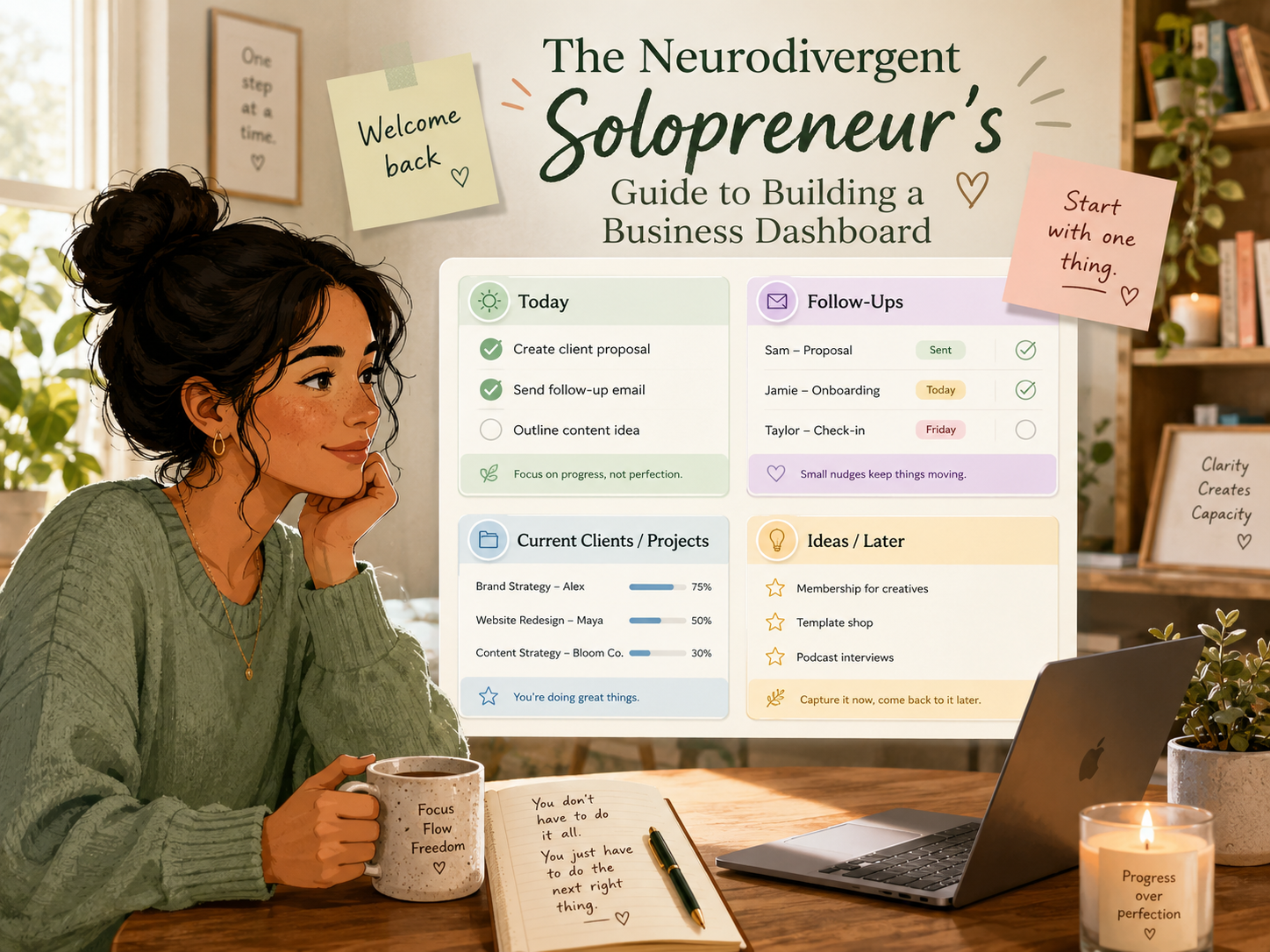
Create four sections:
- Today
- Follow-Ups
- Current Clients / Projects
- Ideas / Later
That is your starter dashboard.
Simple. Clear. Useful.
Let’s break down each box.
Box 1: Today
The Today section answers one question:
What needs my attention right now?
Not everything.
Not your entire business.
Not your hopes, dreams, admin backlog, and content strategy for the next quarter.
Just today.
Keep this section tiny.
Aim for:
- 1 must-do
- 1 should-do
- 1 nice-to-do
Or use:
- Top priority
- Quick win
- Low-energy option
Examples:
Must-do: Send proposal to Jordan
Should-do: Outline client welcome email
Nice-to-do: Add three ideas to content bank
Or:
Top priority: Finish client notes
Quick win: Reply to one email
Low-energy option: Organize follow-up list
This gives your brain choices without giving it 400 choices.
A tiny Today section is especially helpful when you are tired, overstimulated, or coming back after avoidance.
Box 2: Follow-Ups
The Follow-Ups section is where you stop relying on memory.
Bless memory, but she is not always on payroll.
This section should track anyone you need to reconnect with.
That might include:
- Leads
- Clients
- Past clients
- Collaborators
- Vendors
- People waiting for a reply
- People you are waiting on
Keep it simple.
Use four fields:
- Name
- Why
- Date
- Next action
Example:
| Name | Why | Date | Next Action |
|---|---|---|---|
| Maya | Proposal sent | Friday | Send check-in |
| Alex | Invoice pending | Wednesday | Send reminder |
| Sam | Waiting on files | Monday | Ask for assets |
You do not need a giant CRM to start remembering follow-ups.
You need one visible place where follow-ups cannot hide.
For ADHD solopreneurs, this one section can create a lot of relief.
Because “I need to remember to follow up” becomes:
“It is already written down.”
Beautiful.
Box 3: Current Clients / Projects
This section shows what is actively in motion.
Not every client you have ever had.
Not every idea you might pursue.
Just what is currently alive.
Depending on your business, this box might track:
- Active clients
- Current projects
- Open orders
- Service packages
- Consulting work
- Coaching clients
- Virtual assistant clients
- Travel planning clients
- Beauty clients
- Digital product projects
Useful fields include:
- Client or project name
- Status
- Next step
- Due date
- Notes link
Example:
| Project | Status | Next Step |
|---|---|---|
| Client A Website Copy | In progress | Draft homepage |
| Client B Coaching Package | Active | Prepare session notes |
| Lead Magnet Refresh | Paused | Review outline |
This section helps prevent the “out of sight, out of mind” problem.
Because if a project is active, it needs to be visible.
Box 4: Ideas / Later
Neurodivergent entrepreneurs are often idea machines.
New offer idea.
New content idea.
New product idea.
New brand direction.
New system rebuild.
New “what if I start a podcast?” moment.
Ideas are valuable.
But they can also hijack your day if they do not have a place to land.
That is what the Ideas / Later box is for.
It lets you capture ideas without immediately acting on them.
Examples:
- Blog post idea
- New service idea
- Email sequence idea
- Product improvement
- Collaboration idea
- Future launch thought
- Content series
- Random business experiment
The key is to make this section feel safe.
You are not saying “no” to the idea.
You are saying:
“Not now, but I caught it.”
That alone can calm the mental urgency.
Optional Box 5: Waiting On
Once your four-box dashboard feels stable, you may want to add a fifth section:
Waiting On
This is for things that are not currently your move.
Examples:
- Waiting on client feedback
- Waiting on payment
- Waiting on brand assets
- Waiting on contract signature
- Waiting on tech support
- Waiting on someone to approve something
This section is helpful because ADHD brains can keep trying to solve tasks that are not actually actionable yet.
A Waiting On section gives those tasks a parking spot.
You can stop mentally poking them.
They are not forgotten.
They are just not yours right now.
Optional Box 6: Money Snapshot
Many solopreneurs avoid money tracking because it can feel emotionally loaded.
That is understandable.
But your dashboard can include a very simple money snapshot without becoming a full accounting system.
Try tracking:
- Invoices to send
- Payments expected
- Payments received
- Subscriptions to cancel
- Expenses to review
Keep it gentle.
Example:
| Money Item | Status |
|---|---|
| Send invoice to Client A | Today |
| Payment from Client B | Expected Friday |
| Review software subscription | Later |
You do not have to look at every number every day.
But having a visible money section can reduce the “I feel like I’m forgetting something expensive” stress.
How to Build Your Dashboard Without Overbuilding It

Now let’s talk about the trap.
The second you decide to build a dashboard, your brain may want to build the perfect dashboard.
Suddenly you need icons.
Then matching colors.
Then formulas.
Then templates.
Then automations.
Then you spend six hours designing the dashboard and zero minutes using it.
Been there.
No judgment.
But the goal is not to build a beautiful digital museum.
The goal is to build a tool you can use.
Here is a low-friction build process.
Step 1: Pick One Place
Choose where your dashboard will live.
Possible options:
- Notion
- Google Sheets
- Airtable
- Trello
- ClickUp
- Paper planner
- Whiteboard
- Printable page
- LiteFolio workspace
Do not start by comparing every tool.
Pick the one you are most likely to open.
That is the best one.
A tool you actually use beats a perfect tool you avoid.
Step 2: Create the Four Boxes
Make four sections:
- Today
- Follow-Ups
- Current Clients / Projects
- Ideas / Later
That is it.
Do not add seventeen extra sections yet.
You can always expand later.
Start small enough that your brain does not revolt.
Step 3: Add Only What Is Active
Now fill in the dashboard with active information.
For Today, add only today’s real priorities.
For Follow-Ups, add people you actually need to follow up with.
For Current Clients / Projects, add what is truly active.
For Ideas / Later, add the ideas currently floating around your brain.
Do not migrate your whole business history into the dashboard.
That is how dashboards become haunted.
Step 4: Add a “Start Here” Cue
A dashboard should help you begin.
Add one small cue at the top.
Examples:
- Start here
- What matters today?
- Pick one thing
- Check follow-ups first
- Welcome back
- Today can be simple
This may sound tiny, but it helps.
When you open the dashboard tired or overwhelmed, a clear starting cue reduces friction.
Your dashboard should orient you.
Step 5: Make It Easy to Reset
Add a weekly or daily reset prompt.
Something like:
- What is still active?
- What needs follow-up?
- What can move to later?
- What is the next tiny step?
- What can I ignore for now?
This makes re-entry easier.
And re-entry is everything for ADHD-friendly systems.
How Often Should You Check Your Dashboard?
Do not create a rule you already know you will rebel against.
Instead of saying, “I must check this every morning forever,” try attaching dashboard checks to existing moments.
Examples:
- Before starting client work
- Before checking email
- After lunch
- At the end of your workday
- Monday morning planning
- Friday reset
- Before a client call
- When you feel scattered
The goal is not perfect consistency.
The goal is useful return.
A dashboard you check three times a week is better than a dashboard you abandon because daily use felt too rigid.
Signs Your Dashboard Is Too Complicated
Your dashboard may need simplifying if:
- You avoid opening it
- You keep rebuilding it
- It takes too long to update
- You have too many categories
- You forget what sections mean
- You need a tutorial to use your own system
- You feel guilty when you see it
- You track things you never review
- You have more dashboards than decisions
Oof.
That last one stings a little.
But it matters.
The dashboard should create clarity, not become another place where tasks go to disappear.
How to Make Your Dashboard Easier on ADHD Brains

Here are a few simple design choices that help reduce cognitive load.
Use Clear Labels
Instead of clever section names, use obvious ones.
Better:
- Today
- Follow Up
- Waiting On
- Clients
- Ideas
Less helpful:
- Command Center
- Momentum Portal
- Action Matrix
- Strategic Growth Hub
Listen, “Strategic Growth Hub” sounds fancy.
But when your brain is tired, “Today” wins.
Use Fewer Colors
Color can help, but too much color becomes noise.
Try assigning colors by meaning.
For example:
- Yellow = today
- Pink = follow-up
- Blue = client work
- Green = ideas
- Gray = waiting
Keep it consistent.
Your brain should not need to decode a rainbow.
Keep the Front Page Light
Your main dashboard should be scan-friendly.
Use:
- Short labels
- Small lists
- Simple cards
- Checkboxes
- Visual spacing
- Bold headings
Avoid giant walls of text.
Yes, even if the text is important.
Especially if the text is important.
Use “Later” Generously
The Later section is your friend.
It protects your focus.
It lets you capture ideas without chasing every idea.
This is especially helpful if you get sudden bursts of inspiration while trying to finish something else.
Write it down.
Park it.
Come back later.
Build for Low-Energy Days
Ask yourself:
“Could I use this dashboard when I am tired?”
If the answer is no, simplify it.
Your dashboard should support you on low-energy days, not only on fresh-start Monday mornings.
Dashboard Example for a Service-Based Solopreneur
Here is what a simple dashboard might look like.
Today
- Send proposal to Maya
- Reply to Alex
- Outline one blog section
Follow-Ups
- Jordan — invoice reminder — Thursday
- Sam — waiting on assets — Friday
- Lee — check in after discovery call — Monday
Current Clients / Projects
- Client A — website copy — draft homepage
- Client B — coaching package — prep session notes
- Client C — VA support — update task list
Ideas / Later
- Blog post about client onboarding
- New lead magnet idea
- Instagram series on low-energy workdays
- Product bundle concept
That is a dashboard.
No fireworks required.
It is useful because it answers the core question:
“What needs my attention?”
Dashboard Example for a Product-Based Solopreneur
If you sell digital products or templates, your dashboard may look slightly different.
Today
- Update product description
- Schedule one promo email
- Check customer question
Follow-Ups
- Affiliate partner — send link
- Customer support reply — refund question
- Brand collab — check response
Current Projects
- New template refresh
- Sales page update
- Email welcome sequence
- Product photo updates
Ideas / Later
- Bundle offer
- Tutorial video
- Seasonal sale
- Blog post series
Again, simple.
The best dashboard fits the business you actually run.
Dashboard Example for a Client-Based Creative
For designers, writers, consultants, coaches, virtual assistants, travel advisors, beauty pros, or service providers, your dashboard might focus heavily on clients.
Today
- Client call at 11
- Send recap email
- Update project notes
Follow-Ups
- Past client — ask about next project
- Lead — send package info
- Vendor — confirm availability
Current Clients
- Client A — active — next step: draft
- Client B — waiting — next step: feedback
- Client C — onboarding — next step: welcome email
Ideas / Later
- Client welcome packet update
- Referral email template
- New service offer
- Content idea: behind the scenes
This kind of dashboard helps prevent client details from becoming scattered across your inbox, notes app, and memory.
The Dashboard Rule: Fewer Sections, Better Use
Here is the rule to remember:
A dashboard is only helpful if you can use it quickly.
Not perfectly.
Quickly.
If it takes 20 minutes just to figure out what is happening, it is too heavy.
A good ADHD-friendly dashboard should help you:
- Open it
- Scan it
- Pick a next step
- Take action
That is the loop.
Open. Scan. Pick. Do.
Not open, panic, reorganize, redesign, avoid, and then start over Monday.
We are done with that loop.
When to Use a Done-for-You Dashboard
You can absolutely build your own dashboard.
But sometimes, building the system becomes the thing that delays the work.
That is where a done-for-you system can help.
A good done-for-you dashboard gives you structure without making you design every section from scratch.
For ADHD and neurodivergent solopreneurs, that can reduce decision fatigue fast.
Instead of asking:
“How should I organize my entire business?”
You can start with:
“Where does this information go?”
That is easier.
Much easier.
This is where the LiteFolio Collection fits naturally. The article introduces the dashboard concept, and the CTA chart recommends guiding readers to the collection because it represents the full product ecosystem for ADHD-first business organization.
Explore the LiteFolio Collection
If your business information is scattered across your inbox, notes app, planner, spreadsheets, and memory, you do not have to build your system from scratch.
Explore the LiteFolio Collection to find ADHD-first business systems designed to help you organize clients, follow-ups, projects, notes, and ideas in a more visual, low-friction way.
Less “Where did I put that?”
More “Oh, there it is.”
That is the kind of business support your brain deserves.
FAQs About Business Dashboards for Neurodivergent Solopreneurs
What is a business dashboard for solopreneurs?
A business dashboard is a central place where solopreneurs can see the most important parts of their business, such as tasks, clients, follow-ups, projects, ideas, and priorities.
Why are dashboards helpful for ADHD entrepreneurs?
Dashboards are helpful for ADHD entrepreneurs because they make information visible. This reduces the need to rely on memory and helps with prioritization, task initiation, and follow-through.
What should I include in an ADHD-friendly business dashboard?
Start with four simple sections: Today, Follow-Ups, Current Clients or Projects, and Ideas / Later. You can add Waiting On or Money Snapshot sections once the basics feel easy to maintain.
What makes a dashboard neurodivergent-friendly?
A neurodivergent-friendly dashboard is simple, visual, flexible, easy to scan, and easy to return to after falling behind. It should reduce cognitive load instead of adding more tasks.
Do I need a complicated tool to build a business dashboard?
No. You can build a dashboard in a notebook, whiteboard, spreadsheet, Notion page, printable planner, or done-for-you workspace. The best tool is the one you are most likely to open and use.
Final Takeaway
A business dashboard does not need to be fancy to be effective.
For neurodivergent solopreneurs, the best dashboard is usually the one that makes your business feel less scattered and more visible.
Start with four boxes:
Today.
Follow-Ups.
Current Clients / Projects.
Ideas / Later.
That is enough.
You do not need to track everything.
You do not need to build the perfect system.
You do not need to become a different kind of entrepreneur.
You need a clear home base that helps you come back, see what matters, and take one next step.
Build small.
Keep it visible.
Make re-entry easy.
And remember: your dashboard is not there to prove you are productive.
It is there to support the way your brain works.
-
Posted in
ADHD, attention deficit disorder, attention deficit hyperactivity disorder, AuDHD, executive functioning, low-energy, minimally viable system, time management
